That’s where image to video AI comes in. You feed it a photo, tell it how you want things to move, and it generates a video clip that actually looks like someone planned and shot it. It’s fast, it’s getting ridiculously good, and it’s changing how people think about content.
So What’s Actually Happening Under the Hood?
You upload a photo. Could be a product shot, a selfie, a landscape, a piece of concept art — doesn’t really matter. Then you write a short prompt describing the motion you’re after. Maybe you want the camera to slowly orbit around a pair of sneakers. Maybe you want a portrait subject to turn their head and smile. Maybe you want storm clouds rolling over a mountain range.
The AI looks at your image and figures out depth, lighting, subject boundaries, and spatial relationships. Then it generates new frames — not by stretching or warping your photo, but by actually predicting what realistic motion would look like from that starting point.
The output? A smooth, natural-looking video clip. Not a slideshow. Not a cheap zoom effect. Actual motion that feels intentional.
A year ago this stuff looked like a cool tech demo. Now it looks like footage.
Why Bother? Because Static Is Losing
This isn’t about chasing trends for the sake of it. The numbers are pretty clear. Video content gets significantly more reach and engagement than static images on every major platform. Instagram, TikTok, YouTube, LinkedIn — they all push video harder in their algorithms.
But here’s the disconnect: taking a good photo is relatively easy. Producing a good video is not. There’s a skill gap, a time gap, and often a budget gap between the two.
Image to video AI closes that gap almost entirely. You don’t need to reshoot anything. You don’t need to learn Premiere Pro. You just need to describe what you want to see happen.
Where People Are Actually Using This
The use cases are broader than you might expect.
Social media creators are probably the most obvious group. One photo can become five different video clips with different moods, camera angles, and motion styles. That’s a week of content from a single image.
E-commerce sellers are turning flat product photos into dynamic showcase clips. A static image of a handbag on a white background becomes a rotating, cinematic product video. No photographer needed for the second round.
Real estate is a natural fit. Property photos with added camera movement and atmospheric effects make listings feel more premium and get more clicks.
Educators and explainer creators use it to animate diagrams, historical photos, and illustrations. A static infographic becomes a short animated sequence that holds attention way better in a lecture or social post.
Filmmakers and screenwriters are using image to video AI as a movie trailer maker. Take storyboard frames or concept art, run them through the AI, and suddenly you have a visual pitch that looks like an actual teaser. You’re not just describing your vision anymore — you’re showing it. Pair that with text to video AI for scenes where no reference image exists, and you can assemble a full proof-of-concept without ever touching a camera.
Marketers are converting static ad creatives into video ads. Same concept, same visual identity, but in a format that performs dramatically better on paid channels.
What to Look For in a Tool
There are a lot of options out there now, and quality varies wildly. A few things worth paying attention to:
Motion quality. This is the big one. Bad tools produce jittery, warped output that looks obviously AI-generated. Good tools produce motion that feels smooth and deliberate.
Prompt control. You want to be able to tell the AI what to do, not just hope it makes a good guess. Specific prompt support makes a huge difference in output quality.
Speed. If it takes 20 minutes to generate a 4-second clip, the efficiency argument falls apart. The best tools deliver results in under a minute.
Model variety. Different AI models are good at different things. Photorealism, animation, stylized content — having access to multiple models means better results across different types of projects.
Connected workflows. The most useful platforms don’t just do image to video in isolation. They combine it with image generation, audio tools, editing, and export options so you can finish a project without bouncing between five different apps.
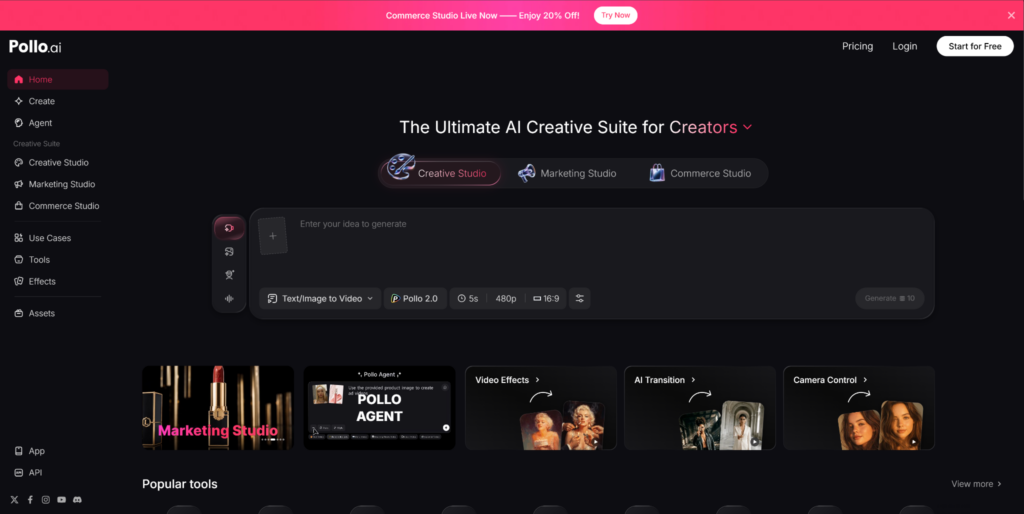
Pollo AI is worth a look if you want all of this in one place. Its Creative Studio puts image to video alongside text to video AI, image generation, avatar creation, audio tools, and editing. Multiple AI models are available from a single interface, so you can match the right model to the right project.
Beyond creation, Pollo AI also offers Marketing Studio for turning content into ad creatives, and Commerce Studio for e-commerce product visuals. There’s also a mobile app — so you can go from photo to finished video on your phone.
The Bottom Line
Every photo you’ve ever taken is now potential video content. That’s not hype — it’s just what the technology does now. Image to video AI is fast, the quality is real, and the workflow is dead simple.
Your photos are already good. Now let them move.